
Remote Access
Band supports remote access to your dashboard and API through a Cloudflare tunnel. This allows you to send messages to agents, watch chat output, and review diffs from any device — including your phone — without opening ports or configuring a VPN.
The local web server
When the Band desktop app launches it boots a local web server on
http://localhost:3456 (the port is configurable via the
webServerPort setting). This server hosts the dashboard UI,
the tRPC API the CLI talks to, and the streaming endpoints for chat,
terminals, and language servers.
The window you see in the Band app is just a wrapper around that web
server. You can open http://localhost:3456 in any browser on
the same machine and get the same dashboard — useful for opening the
UI in a second window, on another monitor, or from a sibling laptop on the
same network. Remote access works by exposing this same server through a
Cloudflare tunnel.
How It Works
Band uses cloudflared (Cloudflare's tunnel client) to create a secure, encrypted connection between your local machine and Cloudflare's network. Traffic is routed through Cloudflare's infrastructure, and a temporary public URL is generated for your session.
- Band starts a cloudflared tunnel process on your machine.
- Cloudflare assigns a temporary public URL (e.g.,
https://abc-def-123.trycloudflare.com). - Remote clients authenticate with the persistent token from
~/.band/settings.json.
Prerequisites
Install cloudflared before using the tunnel feature:
# macOS
brew install cloudflared

# Linux (Debian/Ubuntu)
sudo apt install cloudflared

# Other platforms
# Download from https://developers.cloudflare.com/cloudflare-one/connections/connect-networks/downloads/
No Cloudflare account is required. Band uses cloudflared's free quick tunnel feature.
Starting the Tunnel
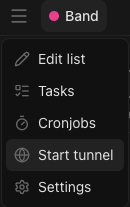
From the desktop app, open the hamburger menu in the top-left of the window and click Start tunnel. The dashboard begins displaying the public URL and a QR code as soon as the tunnel is up.
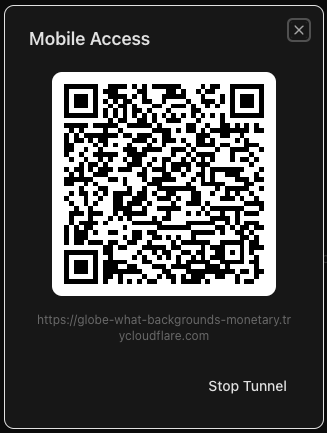
Once the tunnel is up the dashboard opens a Mobile Access panel with a QR code, the public URL, and a Stop Tunnel button. Scan the QR code with your phone's camera to open the dashboard on mobile, or copy the URL directly to share it with another device.
You can also start it from the CLI:
band tunnel start
The command prints the public URL on stdout. The auth token is the
tokenSecret stored in ~/.band/settings.json — it's the
same token used for local API access.
$ band tunnel start
https://abc-def-123.trycloudflare.com

$ jq -r .tokenSecret ~/.band/settings.json
0123456789abcdef…   # 64-character hex token
Stopping the Tunnel
Click Stop Tunnel in the Mobile Access panel, or run the CLI equivalent:
band tunnel stopStopping the tunnel immediately revokes the public URL. Any connected remote clients will be disconnected.
Custom Subdomains
By default, cloudflared assigns a random subdomain that changes each time the tunnel restarts. For a stable URL, configure a custom subdomain through your Cloudflare account:
- Create a tunnel in the Cloudflare Zero Trust dashboard.
- Configure a DNS record pointing to your tunnel (e.g.,
band.yourdomain.com). - Configure Band to use the named tunnel instead of the quick tunnel.
Token-Based Authentication
Every request to the Band API — local or remote — is protected by a token. The
token is generated on first launch (a 64-character hex string) and stored in
~/.band/settings.json under tokenSecret.
- Read it from
~/.band/settings.jsonwithjq -r .tokenSecret ~/.band/settings.json, or open the dashboard's mobile-access panel. - Set
BAND_TOKENfor CLI access from a remote machine. - The web interface accepts the token as a
?token=…query parameter on first navigation; the server then sets a cookie so subsequent requests work without it. - The token is not rotated when the tunnel restarts; it persists in
settings.jsonuntil you delete that field.
Mobile Access via QR Code
The desktop app and dashboard display a QR code that encodes both the tunnel URL and authentication token. Scan the QR code with your phone's camera to open the Band dashboard instantly — no need to manually type the URL or token.
This is the fastest way to set up mobile access: start the tunnel, scan the QR code, and you are connected.
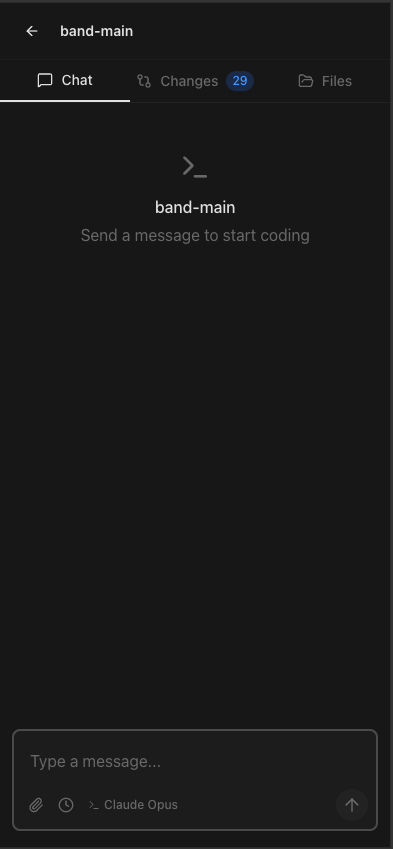
On phones the dashboard collapses to a single-pane layout with a tab bar for the most-used panes — Chat, Changes, and Files — plus a back button to return to the workspace list. Sending a message, watching streamed agent output, reviewing a diff, and opening files all work the same as on desktop; only the arrangement changes.
Security Considerations
- All traffic is encrypted end-to-end through Cloudflare's network.
- The authentication token is required for all API requests and dashboard access.
- The same token guards local and remote requests; rotate it by deleting
tokenSecretfrom~/.band/settings.jsonand restarting the server. - The tunnel can be stopped at any time to immediately revoke remote access.
- No ports are opened on your local firewall.