
Adding Your First Project
A project in Band is a registered git repository. Once you add a project, Band tracks it and lets you create workspaces (isolated git worktrees) from it. You need at least one project before you can create workspaces or dispatch tasks.
Requirements
The directory you register must be a git repository. Band uses git
worktrees under the hood, so it needs a valid .git directory to work with.
The repository can be any size and can have any branch structure.
Add a project via the dashboard
- Open the Band dashboard.
- Click the "Add Project" button in the sidebar.
- In the Register Project dialog, type the path to your git repository, or click the folder icon to browse for it.
- Click Add Project.
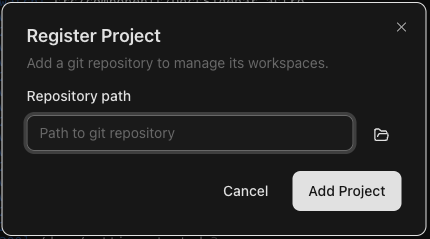
The project appears in the sidebar immediately. Band detects the project
name from the repository's directory name, picks up the default branch
(usually main or master), and displays the number
of existing worktrees.
Add a project via the CLI
You can also register a project from your terminal using the Band CLI:
band projects add /path/to/your/repoFor example, to register a project located at ~/code/my-app:
band projects add ~/code/my-appYou can optionally assign a label to the project to help organize your projects:
band projects add ~/code/my-app --label "work"To verify the project was added, list all registered projects:
band projects list
This outputs a tab-separated list showing each project's name, path, and worktree count.
For structured output, add the --output json flag:
band projects list --output jsonWhat happens when you add a project
When you register a project, Band does the following:
- Validates the repository — Confirms the path points to a valid
git repository with a
.gitdirectory. - Detects the default branch — Identifies the main branch
(e.g.,
main,master) so workspaces can be branched from it. - Discovers existing worktrees — If the repository already has git worktrees, Band picks them up and displays them as workspaces.
- Reads project configuration — If a
.band/config.jsonfile exists in the repository, Band reads it for setup and teardown scripts that run when workspaces are created or removed.
Removing a project
If you want to unregister a project, you can do so from the CLI:
band projects remove my-appThis removes the project from Band's registry but does not delete the repository or any of its files from disk.
Next step
With a project registered, you are ready to create your first workspace.