
Introduction
You started using an AI coding agent on one project. Then a second agent. Now you've got Claude Code running in a Cursor terminal, Codex in a VS Code window, OpenCode in a Zed split, three half-finished branches, and no idea which one was actually working on the bug. Your IDE wasn't designed for this — you're using it to babysit code an agent wrote, not to write code yourself.
Band is the agent-first IDE. It's a desktop app built from the ground up around AI coding agents: chat panes for talking to them, a code editor and file tree to review what they've done, terminals and browsers to verify it works, and git worktree workspaces to keep parallel agents from stepping on each other — all in one window.
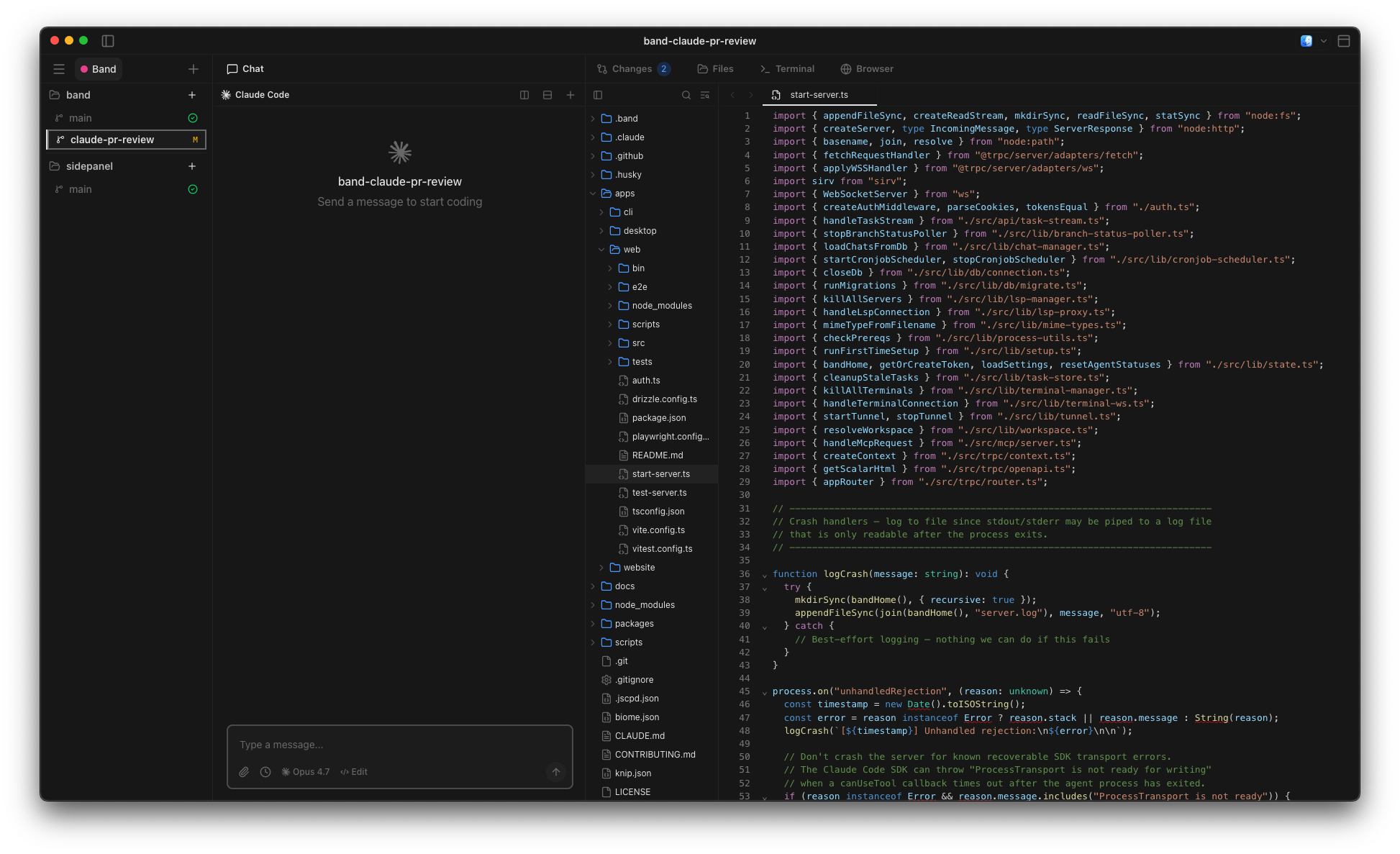
The problem Band solves
If you work with AI coding agents long enough, the same problems show up:
- No central view. Each agent lives in its own terminal, in its own IDE window. Finding the one you care about is a scavenger hunt.
- Agents step on each other. Two agents editing the same branch is a guaranteed conflict. Stashing and resetting between sessions eats your day.
- Context dies on close. Quit your IDE and the chat history, the in-flight task, and the "what was I doing" all go with it.
- Nothing is automatable. You can't put "review every open PR every morning" or "regenerate types after the schema migrates" on a schedule.
How Band fits in
Band runs as a macOS desktop app plus a local web server
(http://localhost:3456) and a band CLI. For
agent-driven work it's the only window you need; when you want to do hands-on
editing, one click opens the active worktree in VS Code, Cursor, Zed,
JetBrains, or Xcode.
A normal day looks like this:
- Register a project by pointing Band at a git repo you already have checked out.
- Create a workspace. Band creates a fresh git worktree on a
new branch in
.band/worktrees/…. Your main checkout is never touched. - Dispatch a task to any coding agent installed on your machine — Claude Code, Codex, or OpenCode. The agent runs against the worktree, in its own chat pane.
- Watch it work from the dashboard, the CLI, or your phone (via the built-in tunnel). When it's done, review the diff, merge or throw away the worktree, and move on.
You can run as many workspaces in parallel as your machine will tolerate, each with its own agent, branch, and chat history.
What you can do with it
- Run multiple agents at once, each isolated to its own worktree. No more "did I commit before letting the next agent start?"
- Dispatch from anywhere — the dashboard, the CLI, or
your own scripts (
band chats create …). - Schedule recurring agent work with cronjobs: daily PR reviews, dependency bumps, type regeneration after a schema change.
- Reach your dashboard remotely through a built-in Cloudflare tunnel, so you can check on a long-running task from your phone or another machine.
- Keep state across restarts. Workspaces, chat history, task
output, and worktree metadata all live in
~/.bandand survive reboots.
What Band is not
- Not a traditional IDE. Band's editor is built for previewing and collaborating on what agents do — reviewing changes, navigating code, scanning the file tree. It's not built for hands-on typing: there's no IntelliSense, no code completion, no snippet library. For deep manual edits, hand off the active worktree to VS Code, Cursor, Zed, JetBrains, or Xcode.
- Not a hosted service. Everything runs locally on your machine. There is no Band cloud, and your code never leaves your laptop because of Band.
- Not bundled with a coding agent. You install
claude,codex, oropencodeyourself; Band drives whichever ones you have.
Platform support
Band is currently available for macOS 11 (Big Sur) or later, on both Apple Silicon and Intel Macs. The desktop app is an Electron app, and the CLI is a standalone Rust binary that ships alongside it. Windows and Linux support is planned for a future release.
Next steps
Get up and running in about five minutes:
- Installation — download the signed
.dmgand install the CLI. - Adding your first project — register a repo with Band.
- Creating your first workspace — spin up an isolated worktree.
- Running your first task — dispatch a prompt to a coding agent.