
Adding Your First Repo
A repo in Band is a registered git repository. Once you add a repo, Band tracks it and lets you create worktrees (isolated git worktrees) from it. You need at least one repo before you can create worktrees or dispatch tasks.
Requirements
The directory you register must be a git repository. Band uses git
worktrees under the hood, so it needs a valid .git directory to work with.
The repository can be any size and can have any branch structure.
Add a repo via the dashboard
- Open the Band dashboard.
- Click the "Add Repo" button in the sidebar.
- In the Register Repo dialog, type the path to your git repository, or click the folder icon to browse for it.
- Click Add Repo.
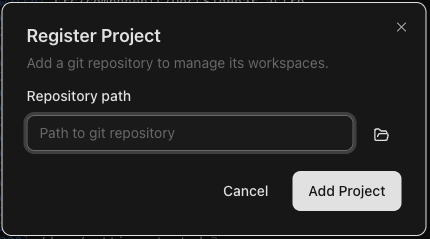
The repo appears in the sidebar immediately. Band detects the repo
name from the repository's directory name, picks up the default branch
(usually main or master), and displays the number
of existing worktrees.
Add a repo via the CLI
You can also register a repo from your terminal using the Band CLI:
band repos add /path/to/your/repoFor example, to register a repo located at ~/code/my-app:
band repos add ~/code/my-appYou can optionally assign a label to the repo to help organize your repos:
band repos add ~/code/my-app --label "work"To verify the repo was added, list all registered repos:
band repos list
This outputs a tab-separated list showing each repo's name, path, and worktree count.
For structured output, add the --output json flag:
band repos list --output jsonWhat happens when you add a repo
When you register a repo, Band does the following:
- Validates the repository — Confirms the path points to a valid
git repository with a
.gitdirectory. - Detects the default branch — Identifies the main branch
(e.g.,
main,master) so worktrees can be branched from it. - Discovers existing worktrees — If the repository already has git worktrees, Band picks them up and displays them as worktrees.
- Reads repo configuration — If a
.band/config.jsonfile exists in the repository, Band reads it for setup and teardown scripts that run when worktrees are created or removed.
Removing a repo
If you want to unregister a repo, you can do so from the CLI:
band repos remove my-appThis removes the repo from Band's registry but does not delete the repository or any of its files from disk.
Next step
With a repo registered, you are ready to create your first worktree.